
Official UFABET Login Portal: Verifying SSL and Domain Authenticity

To know if you are on the real UFABET login page, first look at the address bar in your browser. It should start with https://. Then, see who provided the certificate to make sure it comes from someone you trust. Also, make sure the main site is the same as the one you have saved. There should not be any extra letters or jumps to another page.
Most sign-in pages you find online use words like “bank-grade security.” They do not tell you how the people check the page you see. A browser padlock now only says your traffic is safe. It does not tell you much about who runs the site. TLS is easy and free for sites to use, so this alone does not show if the site can be trusted. When you go right to the UFABET Login (UFABET เข้าสู่ระบบ), you have to look at how your traffic is protected and who really owns the web address before you send your details.
What the Official Account Access Interface Looks Like
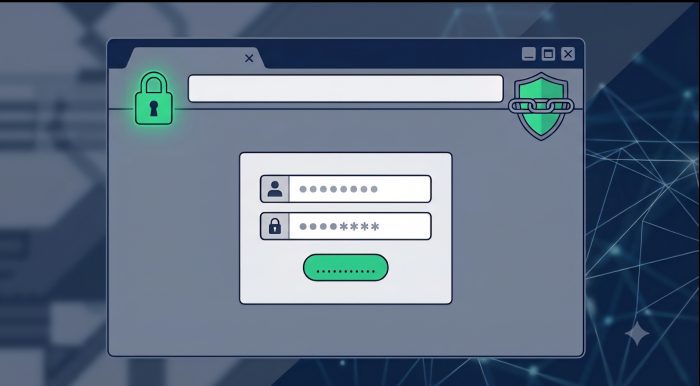
A real login page for UFABET is fast and easy to use. It works well on computers and phones. When you open a true UFABET login access point(ทางเข้า UFABET login) page, you see a simple form. It asks only for your details to access your UFABET member session.
- Minimal Data Fields: As you can see in the OWASP Authentication Cheat Sheet, a regular login page will ask for your username or phone ID and password. A normal sign-in page will not ask for your bank PIN, ATM card number, or any identity papers when you log in.
- Responsive Viewport Architecture: Today, portal pages use simple client tools. This helps text boxes and buttons feel quick and easy to use. The “eye” icon lets you see your password right away on your computer or phone.
- Session Validation Controls: You might get tested for bots, like a CAPTCHA, or asked for a one-time code when you log in. The steps can change if your settings or place change. Because the platform’s backend can be different in each area, it is good to trust the signs your browser gives, and not just what companies say about their own security.
Why HTTPS Alone Does Not Prove Domain Authenticity
Many guidebooks tell you that the padlock on your browser means you have a safe connection. Still, cybersecurity rules say the padlock only shows your data goes in a safe way. It does not tell you who runs the site.
When you use a portal with HTTPS, TLS keeps your data safe as it goes from your device to the server. This blocks people on public Wi-Fi or local networks from seeing your password while it moves. But automated Certificate Authorities can give DV certificates to anyone who has the right to use a domain name. This can be for lookalike domains that try to copy well-known websites.
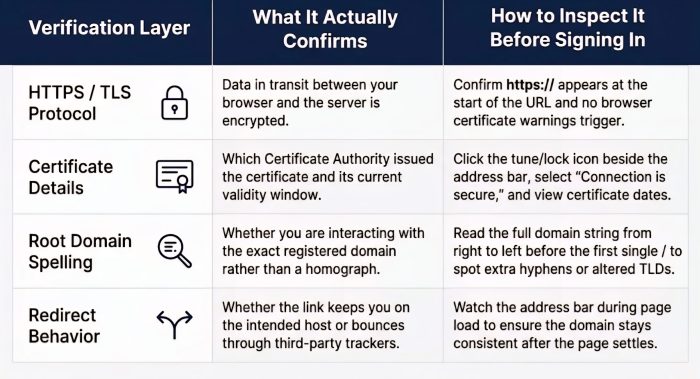
As explained in the NIST SP 800-63B Digital Identity Guidelines, stopping someone from acting like you is about making sure sign-in happens at the right website. A strong password will not keep you safe if you enter it on a fake site that looks like the real one.
Step-by-Step Protocol for Verifying Your Access Point
Doing the same steps every time helps you know what to do when you log in to the official UFABET login on a new browser or phone. You do not need to wonder about anything because you just follow the routine.
- Start From a Previously Checked Bookmark: Do not go to links in public chats or click on search ads. Open a bookmark saved in a session that you checked before. A bookmark helps you not to land on a wrong website by mistake.
- Check the Full Website Address: Before you enter your username, read the whole address bar. Look for changed letters, added numbers, or an ending that is not the one you know. This stops most fake site tricks.
- Look at the TLS Certificate: Make sure your browser says the site is safe. You should not see messages that say the connection is not private or alerts about a certificate that is too old. Browsers like Google Chrome and Microsoft Edge use tools like Google Safe Browsing to help spot bad websites before you give your details.
- Confirm Everything Loads Right After Login: After you log in, check that you see your expected balance and menu options. You should not be asked to put info in a pop-up window that looks like it comes from a different website.
- Use Strong and Different Passwords: Make each password long, with at least 12 characters. Do not use the same one for your email or social media. Always sign out fully when you use
By looking at the URLs and checking the browser certificates each time, people can keep their UFABET login steps fast, correct, and safe every time they log in.
Frequently Asked Questions
1. Does seeing a padlock icon in my browser mean a login page is automatically authentic?
No. In web security, the padlock icon and https:// just mean that the link from your browser to that server is secure. Other sites that try to look the same can also get free TLS certificates. So, you still need to look at the spelling of the site name in the address bar before you put your login details in.
2. Why do official access points sometimes use alternative domain extensions or subdomains?
High-traffic online platforms often use special routing gateways or member subdomains like member.. This helps the servers keep up when there are many people at the same time. The site stays fast that way. When you use a different gateway, make sure it is real. You can ask the official member support. You should save the correct URL, so you can use it again.
3. What should I do if my browser shows a “Connection Is Not Private” warning on the login page?
Do not ignore the warning. Do not enter your username or your password. A privacy or certificate error can mean the TLS certificate is out of date. It might also mean there is a problem with the server name, or someone is trying to look at your data on public Wi-Fi. Try turning your connection off and then turning it back on. Change to cellular data instead of public Wi-Fi. Look at the spelling of the URL again to make sure it is correct.

Roberto Villa is the CEO, Founder, Executive Writer, and Senior Editor of FightBook MMA. Has a passion for Combat Sports and is also a podcast host for Sitting Ringside. He’s also a former MMA fighter and Kickboxer. He’s also the main photographer for the 4CornersMafia Car Club.